
Hashgraph logo
Menu

Brand guidelines

Inactive dot

Logo

Inactive dot

Colors

Inactive dot

Typography

Inactive dot

Content creation

Inactive dot

Iconography

Inactive dot

Trademark

Inactive dot
Hashgraph graphic

Brandguidelinesoverview

About Hashgraph

Hashgraph is an enterprise software firm powering the next generation of connected digital markets. The company develops solutions for financial services that leverage hashgraph technology and provides ongoing support to the Hedera public network. Through cross-ledger interoperability, private network infrastructure, and tokenization platforms, Hashgraph enables institutions to issue, trade, and manage assets seamlessly across systems, helping to drive a more connected digital economy.

Discover more at hashgraph.com/about-us.

Who we are

We’re a team of over 140 professionals worldwide who lead product innovation, technical development, and marketing initiatives geared at growing the Hedera ecosystem.

We exist to enhance the Hedera platform and to build products and services that accelerate app builders time to market.

We’re dedicated to accelerating the adoption of decentralized applications by launching groundbreaking products and services that seamlessly integrate traditional and decentralized finance.

Together, we’re propelling towards an internet of value, where innovation knows no bounds.

Mission

Vision

Logo

Hashgraph primary logo

The Hashgraph logo and icon can be used strategically, but should always appear as a standalone element. It should never be combined or locked up with the Hedera brand logo.

The logo combined with the icon is the standard format to increase awareness of the service name and the graphic.

Hashgraph logo

Download Hashgraph Logo Library

Color and backgrounds

The Hashgraph logo is only available in a horizontal format. The primary logo is black, while the reverse version is white. Choose the version that offers the best contrast and aligns with the overall design.

  1. Always consider the overall design layout to determine the best option.
  2. Avoid creating unauthorized lock-ups.
  3. The icon is an integral part of the logo and should not be separated.

Hashgraph logo

Do nots of primary logo

Do not use the icon repeatedly
Do not icon

Do not use the icon repeatedly

Do not create a lock-up with marketing messages

Do not icon

Do not create a lock-up with marketing messages

Do not change the lock-up color
Do not icon

Do not change the lock-up color

Do not change the typeface

Do not icon

Do not change the typeface

Do not add drop shadows

Do not icon

Do not add drop shadows

Do not use a gradient effect
Do not icon

Do not use a gradient effect

Do not place on busy backgrounds with insufficient contrast
Do not icon

Do not place on busy backgrounds with insufficient contrast

Do not add an outline to logo
Do not icon

Do not add an outline to logo

Do not flip the icon.
Do not icon

Do not flip the icon

Clear space & minimum size

  1. Use the x-height to determine the clear space around the logo. The x-height is the distance between the character baseline and the imaginary mean line that marks the tops of lowercase letters.
  2. Since the logo has a curved leading character, it should be spaced 90% of the x-height from the icon.
  3. Always leave a minimum clear space equal to 65% of the x-height around the logo.
  4. Font: Styrene A | Kerning: Auto | Tracking: -5px
  5. Do not size the logo smaller than 16.93mm in width for print media and 64px in width for digital media to ensure legibility.
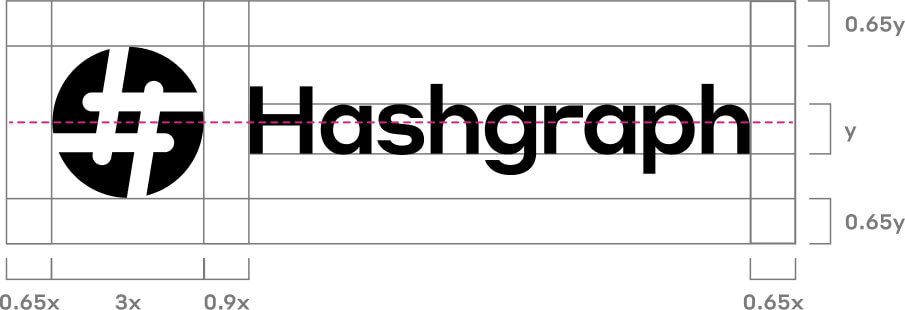
Hashgraph logo bounding space

Hashgraph logomark

The Hashgraph icon may be used on its own when the service name (Hashgraph) is already included in the content. Always keep the icon within the circle.

Icon clear space & minimum size

  1. Use the height of the icon with the background to set the clear space and minimum size.
  2. The icon’s clear space is equal to 30% of the height of the icon.
  3. Do not size the logo smaller than 16.93mm in width for print media and 64px in width for digital media to ensure legibility.
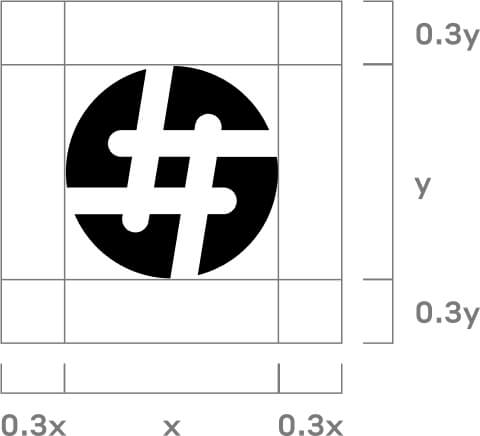
Hashgraph icon bunding space

Do nots of logomark

Do not recreate the icon
Do not icon

Do not recreate the icon

Do not change the icon color
Do not icon

Do not change the icon color

Do not place the icon on a background with insufficient contrast
Do not icon

Do not place the icon on a background with insufficient contrast

Do not change the shape of the icon
Do not icon

Do not change the shape of the icon

Do not apply opacity
Do not icon

Do not apply opacity

Do not icon

Do not add an extra outline

Do not remove the icon background
Do not icon

Do not remove the icon background

Do not flip the icon.
Do not icon

Do not flip the icon.

Download Hashgraph Logo Library

Product logos

Use product logos as standalone elements when creating collateral related to a specific product. The logo paired with the icon is the standard format for enhancing product awareness, and the icon should not be used independently. Always consider the overall design layout to determine the most appropriate option, and do not create unauthorized logo lockups diagonal or adjacent to the Hedera logo.

HashSphere logo

HashSphere logo

The HashSphere logo with icon may be used in full color, black, or white depending on the background and application. Always write HashSphere with a capital “S” to clearly differentiate the product from Hashgraph, the company behind it.

Download HashSphere Logo Library

CLPR logo

CLPR logo

The CLPR (Clipper) logo with icon may be used in black or white depending on the background and application. Always write CLPR in all caps to clearly distinguish the product from Hashgraph, the company behind it.

Download CLPR Logo Library

Colors

Primary

Hashgraph primary color palette should be used as the official brand colors in marketing materials and on Hashgraph’s digital channels.

Cold Black

#111116

17 17 22

23 23 0 91

Pure White

#FFFFFF

255 255 255

0 0 0 0

Plum

#752270

117 34 112

0 71 4 54

Cerise

#C82A80

200 42 128

0 79 36 22

Deep Koamaru

#250E62

37 14 98

63 86 0 62

Secondary

A balanced color palette with high-contrast combinations to ensure UI card elements remain visually distinct, accessible, and easy to scan across different backgrounds.

Light Blue

#E4ECFF

228 236 255

11 7 0 0

Grey

#F3F3F3

243 243 243

0 0 0 5

Pure Black

#000000

0 0 0

0 0 0 100

Aqua

#00CDFF

0 205 255

100 20 0 0

Neutral

Use neutral colors for divider lines and diagrams to maintain clarity, reduce visual noise, and support overall content hierarchy without competing with primary brand elements.

Neutral 100

#D3D3D3

211 211 211

0 0 0 17

Neutral 500

#7A7A7A

122 122 122

0 0 0 52

Typography

Typography is another key element that, when used consistently, helps create brand recognition and familiarity. Hashgraph utilizes the Styrene font family as its primary sans-serif typeface to establish the brand’s tone and visual identity. For non-designers creating presentations or Word document templates, Hashgraph also provides Inter as a replacement font. Both typefaces are used across a variety of weights.

Examples of the two fonts can be found below:
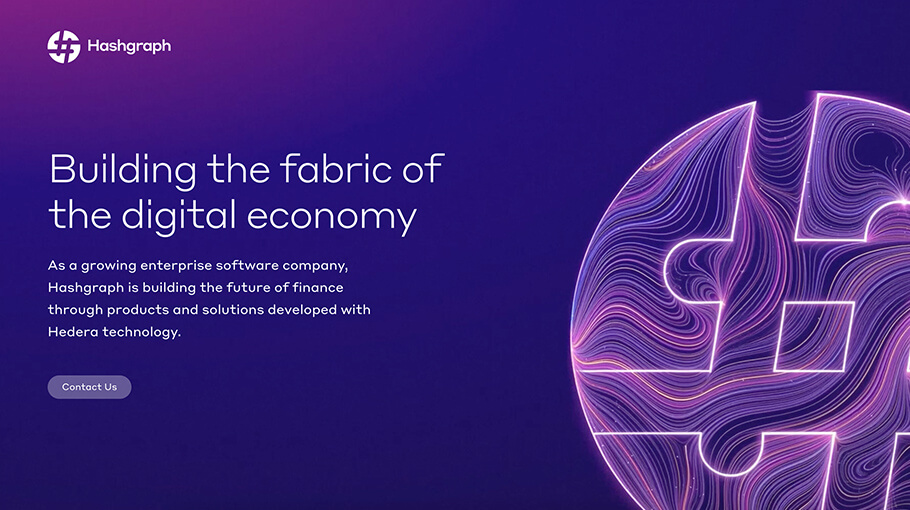
Styrene font use sample
Styrene font use sample

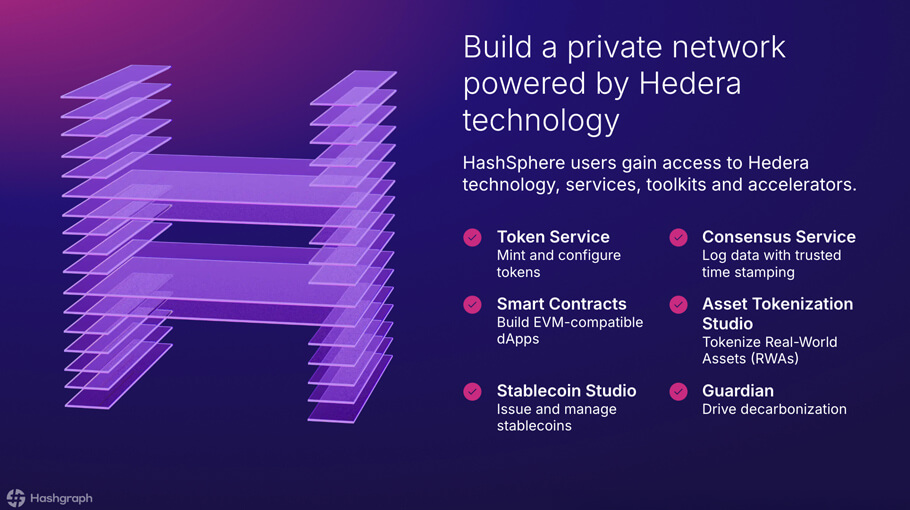
Inter font use sample

Inter font use sample

Hashgraph logo

hashgraph.com

Copyright © 2026 Hashgraph. All Rights Reserved. All trademarks and company names are the property of their respective owners. Hashgraph uses the third-party marks with permission.

Hashgraph graphic

Brandguidelinesoverview

About Hashgraph

Hashgraph is an enterprise software firm powering the next generation of connected digital markets. The company develops solutions for financial services that leverage hashgraph technology and provides ongoing support to the Hedera public network. Through cross-ledger interoperability, private network infrastructure, and tokenization platforms, Hashgraph enables institutions to issue, trade, and manage assets seamlessly across systems, helping to drive a more connected digital economy.

Discover more at hashgraph.com/about-us.

Who we are

We’re a team of over 140 professionals worldwide who lead product innovation, technical development, and marketing initiatives geared at growing the Hedera ecosystem.

We exist to enhance the Hedera platform and to build products and services that accelerate app builders time to market.

We’re dedicated to accelerating the adoption of decentralized applications by launching groundbreaking products and services that seamlessly integrate traditional and decentralized finance.

Together, we’re propelling towards an internet of value, where innovation knows no bounds.

Mission

Vision

Logo

Hashgraph primary logo

The Hashgraph logo and icon can be used strategically, but should always appear as a standalone element. It should never be combined or locked up with the Hedera brand logo.

The logo combined with the icon is the standard format to increase awareness of the service name and the graphic.

Hashgraph logo

Download Hashgraph Logo Library

Hashgraph logo

Color and backgrounds

The Hashgraph logo is only available in a horizontal format. The primary logo is black, while the reverse version is white. Choose the version that offers the best contrast and aligns with the overall design.

  1. Always consider the overall design layout to determine the best option.
  2. Avoid creating unauthorized lock-ups.
  3. The icon is an integral part of the logo and should not be separated.

Clear space & minimum size

  1. Use the x-height to determine the clear space around the logo. The x-height is the distance between the character baseline and the imaginary mean line that marks the tops of lowercase letters.
  2. Since the logo has a curved leading character, it should be spaced 90% of the x-height from the icon.
  3. Always leave a minimum clear space equal to 65% of the x-height around the logo.
  4. Font: Styrene A | Kerning: Auto | Tracking: -5px
  5. Do not size the logo smaller than 16.93mm in width for print media and 64px in width for digital media to ensure legibility.
Hashgraph logo bounding space

Do nots of primary logo

Do not use the icon repeatedly
Do not icon

Do not use the icon repeatedly

Do not create a lock-up with marketing messages
Do not icon

Do not create a lock-up with marketing messages

Do not change the lock-up color
Do not icon

Do not change the lock-up color

Do not change the typeface
Do not icon

Do not change the typeface

Do not add drop shadows
Do not icon

Do not add drop shadows

Do not use a gradient effect
Do not icon

Do not use a gradient effect

Do not place on busy backgrounds with insufficient contrast
Do not icon

Do not place on busy backgrounds with insufficient contrast

Do not add an outline to logo
Do not icon

Do not add an outline to logo

Do not flip the icon.
Do not icon

Do not flip the icon

Hashgraph logomark

The Hashgraph icon may be used on its own when the service name (Hashgraph) is already included in the content. Always keep the icon within the circle.

Icon clear space & minimum size

  1. Use the height of the icon with the background to set the clear space and minimum size.
  2. The icon’s clear space is equal to 30% of the height of the icon.
  3. Do not size the logo smaller than 16.93mm in width for print media and 64px in width for digital media to ensure legibility.
Hashgraph icon bunding space

Do nots of logomark

Do not recreate the icon
Do not icon

Do not recreate the icon

Do not change the icon color
Do not icon

Do not change the icon color

Do not place the icon on a background with insufficient contrast
Do not icon

Do not place the icon on a background with insufficient contrast

Do not change the shape of the icon
Do not icon

Do not change the shape of the icon

Do not apply opacity
Do not icon

Do not apply opacity

Do not icon

Do not add an extra outline

Do not remove the icon background
Do not icon

Do not remove the icon background

Do not flip the icon.
Do not icon

Do not flip the icon.

Do not flip the icon.
Do not icon

Do not flip the icon.

Download Hashgraph Logo Library

Product logos

Use product logos as standalone elements when creating collateral related to a specific product. The logo paired with the icon is the standard format for enhancing product awareness, and the icon should not be used independently. Always consider the overall design layout to determine the most appropriate option, and do not create unauthorized logo lockups diagonal or adjacent to the Hedera logo.

HashSphere logo

HashSphere logo

The HashSphere logo with icon may be used in full color, black, or white depending on the background and application. Always write HashSphere with a capital “S” to clearly differentiate the product from Hashgraph, the company behind it.

Download HashSphere Logo Library

CLPR logo

The CLPR (Clipper) logo with icon may be used in black or white depending on the background and application. Always write CLPR in all caps to clearly distinguish the product from Hashgraph, the company behind it.

Download CLPR Logo Library

CLPR logo

Colors

Primary

Hashgraph primary color palette should be used as the official brand colors in marketing materials and on Hashgraph’s digital channels.

Cold Black

#111116

17 17 22

23 23 0 91

Pure White

#FFFFFF

255 255 255

0 0 0 0

Plum

#752270

117 34 112

0 71 4 54

Cerise

#C82A80

200 42 128

0 79 36 22

Deep Koamaru

#250E62

37 14 98

63 86 0 62

Secondary

A balanced color palette with high-contrast combinations to ensure UI card elements remain visually distinct, accessible, and easy to scan across different backgrounds.

Light Blue

#E4ECFF

228 236 255

11 7 0 0

Grey

#F3F3F3

243 243 243

0 0 0 5

Pure Black

#000000

0 0 0

0 0 0 100

Aqua

#00CDFF

0 205 255

100 20 0 0

Neutral

Use neutral colors for divider lines and diagrams to maintain clarity, reduce visual noise, and support overall content hierarchy without competing with primary brand elements.

Neutral 100

#D3D3D3

211 211 211

0 0 0 17

Neutral 500

#7A7A7A

122 122 122

0 0 0 52

Typography

Typography is another key element that, when used consistently, helps create brand recognition and familiarity. Hashgraph utilizes the Styrene font family as its primary sans-serif typeface to establish the brand’s tone and visual identity. For non-designers creating presentations or Word document templates, Hashgraph also provides Inter as a replacement font. Both typefaces are used across a variety of weights.

Examples of the two fonts can be found below:

Styrene font use sample

Styrene font use sample

Inter font use sample

Inter font use sample

Hashgraph logo

hashgraph.com

Copyright © 2026 Hashgraph. All Rights Reserved. All trademarks and company names are the property of their respective owners. Hashgraph uses the third-party marks with permission.

Hashgraph graphic

Brandguidelinesoverview

About Hashgraph

Hashgraph is an enterprise software firm powering the next generation of connected digital markets. The company develops solutions for financial services that leverage hashgraph technology and provides ongoing support to the Hedera public network. Through cross-ledger interoperability, private network infrastructure, and tokenization platforms, Hashgraph enables institutions to issue, trade, and manage assets seamlessly across systems, helping to drive a more connected digital economy.

Discover more at hashgraph.com/about-us.

Who we are

We’re a team of over 140 professionals worldwide who lead product innovation, technical development, and marketing initiatives geared at growing the Hedera ecosystem.

We exist to enhance the Hedera platform and to build products and services that accelerate app builders time to market.

We’re dedicated to accelerating the adoption of decentralized applications by launching groundbreaking products and services that seamlessly integrate traditional and decentralized finance.

Together, we’re propelling towards an internet of value, where innovation knows no bounds.

Mission

Vision

Logo

Hashgraph primary logo

The Hashgraph logo and icon can be used strategically, but should always appear as a standalone element. It should never be combined or locked up with the Hedera brand logo.

The logo combined with the icon is the standard format to increase awareness of the service name and the graphic.

Hashgraph logo

Download Hashgraph Logo Library

Hashgraph logo

Color and backgrounds

The Hashgraph logo is only available in a horizontal format. The primary logo is black, while the reverse version is white. Choose the version that offers the best contrast and aligns with the overall design.

  1. Always consider the overall design layout to determine the best option.
  2. Avoid creating unauthorized lock-ups.
  3. The icon is an integral part of the logo and should not be separated.

Clear space & minimum size

  1. Use the x-height to determine the clear space around the logo. The x-height is the distance between the character baseline and the imaginary mean line that marks the tops of lowercase letters.
  2. Since the logo has a curved leading character, it should be spaced 90% of the x-height from the icon.
  3. Always leave a minimum clear space equal to 65% of the x-height around the logo.
  4. Font: Styrene A | Kerning: Auto | Tracking: -5px
  5. Do not size the logo smaller than 16.93mm in width for print media and 64px in width for digital media to ensure legibility.
Hashgraph logo bounding space

Do nots of primary logo

Do not use the icon repeatedly
Do not icon

Do not use the icon repeatedly

Do not create a lock-up with marketing messages
Do not icon

Do not create a lock-up with marketing messages

Do not change the lock-up color
Do not icon

Do not change the lock-up color

Do not change the typeface
Do not icon

Do not change the typeface

Do not add drop shadows
Do not icon

Do not add drop shadows

Do not use a gradient effect
Do not icon

Do not use a gradient effect

Do not place on busy backgrounds with insufficient contrast
Do not icon

Do not place on busy backgrounds with insufficient contrast

Do not add an outline to logo
Do not icon

Do not add an outline to logo

Do not flip the icon.
Do not icon

Do not flip the icon

Hashgraph logomark

The Hashgraph icon may be used on its own when the service name (Hashgraph) is already included in the content. Always keep the icon within the circle.

Icon clear space & minimum size

  1. Use the height of the icon with the background to set the clear space and minimum size.
  2. The icon’s clear space is equal to 30% of the height of the icon.
  3. Do not size the logo smaller than 16.93mm in width for print media and 64px in width for digital media to ensure legibility.
Hashgraph icon bunding space

Do nots of logomark

Do not recreate the icon
Do not icon

Do not recreate the icon

Do not change the icon color
Do not icon

Do not change the icon color

Do not place the icon on a background with insufficient contrast
Do not icon

Do not place the icon on a background with insufficient contrast

Do not change the shape of the icon
Do not icon

Do not change the shape of the icon

Do not apply opacity
Do not icon

Do not apply opacity

Do not icon

Do not add an extra outline

Do not remove the icon background
Do not icon

Do not remove the icon background

Do not flip the icon.
Do not icon

Do not flip the icon.

Do not flip the icon.
Do not icon

Do not flip the icon.

Download Hashgraph Logo Library

Product logos

Use product logos as standalone elements when creating collateral related to a specific product. The logo paired with the icon is the standard format for enhancing product awareness, and the icon should not be used independently. Always consider the overall design layout to determine the most appropriate option, and do not create unauthorized logo lockups diagonal or adjacent to the Hedera logo.

HashSphere logo

HashSphere logo

The HashSphere logo with icon may be used in full color, black, or white depending on the background and application. Always write HashSphere with a capital “S” to clearly differentiate the product from Hashgraph, the company behind it.

Download HashSphere Logo Library

CLPR logo

The CLPR (Clipper) logo with icon may be used in black or white depending on the background and application. Always write CLPR in all caps to clearly distinguish the product from Hashgraph, the company behind it.

Download CLPR Logo Library

CLPR logo

Color palette

Primary

Hashgraph primary color palette should be used as the official brand colors in marketing materials and on Hashgraph’s digital channels.

Cold Black

#111116

17 17 22

23 23 0 91

Pure White

#FFFFFF

255 255 255

0 0 0 0

Plum

#752270

117 34 112

0 71 4 54

Cerise

#C82A80

200 42 128

0 79 36 22

Deep Koamaru

#250E62

37 14 98

63 86 0 62

Secondary

A balanced color palette with high-contrast combinations to ensure UI card elements remain visually distinct, accessible, and easy to scan across different backgrounds.

Light Blue

#E4ECFF

228 236 255

11 7 0 0

Grey

#F3F3F3

243 243 243

0 0 0 5

Pure Black

#000000

0 0 0

0 0 0 100

Aqua

#00CDFF

0 205 255

100 20 0 0

Neutral

Use neutral colors for divider lines and diagrams to maintain clarity, reduce visual noise, and support overall content hierarchy without competing with primary brand elements.

Neutral 100

#D3D3D3

211 211 211

0 0 0 17

Neutral 500

#7A7A7A

122 122 122

0 0 0 52

Typography

Typography is another key element that, when used consistently, helps create brand recognition and familiarity. Hashgraph utilizes the Styrene font family as its primary sans-serif typeface to establish the brand’s tone and visual identity. For non-designers creating presentations or Word document templates, Hashgraph also provides Inter as a replacement font. Both typefaces are used across a variety of weights.

Examples of the two fonts can be found below:

Styrene font use sample

Styrene font use sample

Inter font use sample

Inter font use sample

Hashgraph logo

hashgraph.com

Copyright © 2026 Hashgraph. All Rights Reserved. All trademarks and company names are the property of their respective owners. Hashgraph uses the third-party marks with permission.